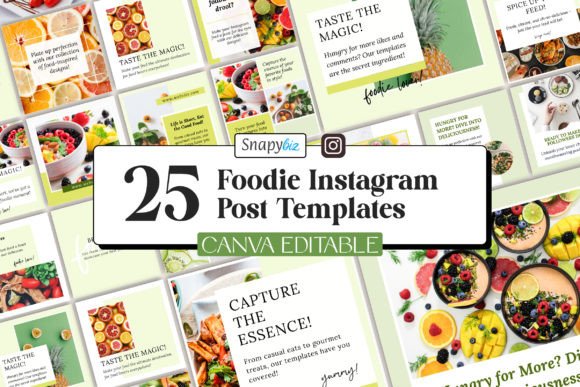
Free Foodie Instagram Canva Templates: A Practical Workflow for Food Bloggers
For any food blogger, the gap between creating a great dish and getting it noticed on Instagram can feel frustratingly wide. You might spend hours perfecting a recipe, styling the plate, and capturing the right lighting. But when it comes to designing a post that actually stops the scroll, the process often slows down. That is where the Free Foodie Instagram Canva Templates come into play. They are not just a design shortcut. They are a workflow tool that sits at the center of your content creation process, helping you move from photo to published post with less friction and more consistency.
These templates are built for the practical reality of running a food blog or a food influencer account. You have a steady stream of content to produce, and each post needs to feel cohesive without looking identical. The templates give you a structural foundation so you can focus your energy on the parts that actually matter: the food, the story, and the engagement with your audience.
Where Free Foodie Instagram Canva Templates Fit in Your Content Process
Every piece of content you publish goes through a cycle: planning, creation, production, publishing, and review. The templates sit squarely in the production phase, but they influence every other stage. When you know what template you will use, you can plan your shots accordingly. You can compose your photo with the template layout in mind, leaving space for text, logos, or decorative elements. That kind of forward planning saves you from cropping headaches later.
Similarly, the templates affect your publishing workflow. Because the design is already locked in, you can batch create your posts weeks in advance. Instead of designing each post from scratch the night before, you set aside a block of time, edit your photos, drop them into the templates, adjust the text, and export. That is a repeatable process that scales with your content calendar.
The templates also interact with your broader asset library. Your brand fonts, colors, and logo should already exist in your Canva account. The templates accept those assets cleanly, so you are not fighting against a design system that does not match your identity. This integration is important because brand consistency across your feed is what signals professionalism to both followers and potential collaborators.
Using the Templates Before, During, and After a Content Project
The most effective food bloggers treat template use as an ongoing part of their workflow, not a one-time setup. Here is how to integrate it into different phases of your work.
Before a Shoot or Recipe Development
Open the template set while you are still planning your next batch of recipes. Look at the layouts. Some templates emphasize horizontal shots, others work better with vertical compositions. Some have space for a title and ingredients list, others are minimal and focus purely on the visual. Choose two or three templates for your upcoming content batch. This decision guides how you style your shoot. You might decide to shoot one recipe in a wide-angle lifestyle shot because the template allows for it, and another as a tight macro shot of the finished dish. Doing this prevents the mismatch between your photo and the template dimensions that often leads to awkward cropping.
During Post Production
Once your photos are edited and color corrected, import them into Canva. With the Foodie Instagram Templates already loaded, you simply drag and drop your image into the designated placeholder. Adjust the crop so the best part of the dish is visible. Then update the text. Keep your copy concise. The templates give you room for a headline, a short description, and maybe a call to action. Use that space to tell people what the dish is, why they should care, and what to do next. Avoid cramming in extra text just because the space exists. Clean, readable text performs better on mobile feeds.
After the text, check the colors. The templates allow easy color editing. If your photo has warm tones, adjust the template accents to complement rather than compete. A quick color match between the template background and your image takes thirty seconds but makes the whole post feel intentional.
After Publishing
Here is a phase many bloggers overlook. After a post goes live, review how the template performed. Did the layout work well with that type of photo? Did the font size hold up on thumbnails? Did the template allow enough breathing room for your brand logo? Take notes. Over time, you will learn which of the Food Blogger Social Media templates work best for dessert shots versus savory dishes, for quick snack posts versus long recipe stories. That knowledge feeds back into your planning phase for the next batch.
Interaction with Other Tools and Platforms
The Foodie Instagram Canva Templates do not exist in isolation. They fit into a larger ecosystem of tools you probably already use. If you manage your content calendar in a platform like Notion, Trello, or Asana, you can link directly to each template draft. That way, when you sit down to produce a post, you already know which template is assigned to which recipe.
For scheduling, you export from Canva and upload to tools like Later, Buffer, or Hootsuite. Because the templates produce uniform dimensions, your grid preview remains consistent. There will be no unexpected gaps or mismatched alignment because every post is built from the same base.
If you work with a team, the templates become a collaboration layer. A photographer can upload images to a shared folder. A writer can draft the caption. A designer can adjust the template colors. Everyone works on the same structure, reducing the back-and-forth that slows down small teams. The templates also help if you outsource content production. Giving a virtual assistant or freelance designer access to your branded templates ensures they produce posts that match your style without needing constant supervision.
Practical Implementation Tips
Getting the most out of the Food Instagram Digital Download templates means setting up your Canva workspace for efficiency. Start by creating a dedicated folder for your food blog. Place the template set inside. Then create subfolders for each content batch, for example, "January recipes," "Summer salads," or "Holiday desserts." As you customize each template, make a copy into the relevant batch folder. This keeps your original templates untouched and ready for reuse.
When editing the text, think about how it will look in the Instagram feed versus the Stories feed. The templates are optimized for the main feed, but you can repurpose them for Stories by adjusting the aspect ratio in Canva. The same template design can work across formats with minimal changes, saving you from designing a separate story from scratch.
One practical observation: templates that include a small accent element, such as a stamp, a circle, or a line divider, tend to perform well because they add visual interest without overwhelming the food photo. When you keep these accents in brand colors, they subtly reinforce recognition over time. Your audience starts associating that specific layout or accent with your content, which builds trust and habit.
Preparation and Organization for Long-Term Use
Before you start using the templates for every post, spend thirty minutes setting up your defaults. Choose your brand colors and save them as Canva brand kit colors. Upload your logo and any recurring graphic elements. Select your primary and secondary fonts. Once these are in place, every template you edit will automatically reflect your brand identity. This upfront work eliminates the need to manually adjust colors and fonts each time.
For organization, name each template clearly. Instead of "Template 1," use a descriptive name like "Recipe card vertical" or "Photo accent left." When you batch produce, you can quickly scan your folder and pick the right layout for the image you are working with. This naming convention also helps if you share templates with collaborators.
Quality control is another consideration. Before publishing, check the template on a mobile device. Canva allows you to preview in mobile view. Look at the text size, the crop on your photo, and the overall balance. A post that looks great on a 27-inch monitor might feel cluttered on a phone screen. Adjust as needed. This small quality check prevents posts that look off when your audience sees them in their feed.
Consistency and Efficiency Over Time
The real value of the Free Foodie Instagram Canva Templates reveals itself over weeks and months. When you use a consistent template set, your feed gains a visual rhythm. Followers begin to recognize your posts before they even read your caption. That recognition means they are more likely to stop, engage, and remember your content. It also makes your account look cohesive, which is a factor brands consider when evaluating potential partnerships.
Efficiency compounds as well. The first time you use a template, you spend a few minutes adjusting it. The fifth time you use that same template, you make those adjustments in seconds. Over the course of a year, the time saved is substantial. That time can go back into content creation, community engagement, or recipe development. For a food blogger, every hour matters.
The templates also support scalability. If you decide to increase your posting frequency, you already have a system in place. You do not need to redesign your visual identity or learn new tools. You simply produce more posts within the framework you have already built. This consistency under pressure is what separates hobbyist accounts from professional food blogs.
Integrating the Templates into Your Routine
The most direct way to integrate the templates into your routine is to make them your default start point. Every time you finish editing a photo, open Canva, pick the appropriate template, and drop the image in. Do not give yourself the option to start from a blank canvas. The templates are designed to be flexible enough for your needs, so treat them as the foundation rather than a fallback.
If you post multiple times per week, designate one session per week as your design block. During that block, you create all your posts for the coming days. You can also repurpose one template into multiple variations by swapping the photo and tweaking the text. This batch approach works well with the Food Blogger Social Media templates because the layouts are consistent enough to reuse, yet each photo brings its own character.
For those who manage both a blog and an Instagram account, the templates can bridge the two. Use the same template style for your Pinterest pins or your blog featured images. That cross-platform consistency reinforces your brand everywhere your audience finds you. It also streamlines your asset creation because one design decision applies to multiple channels.
Final Observations on Practical Value
The Foodie Instagram Templates offered through this digital download are not about chasing trends. They are about building a repeatable, reliable process for creating Instagram posts that represent your food and your brand accurately. The high-resolution images keep your food sharp, the editable text lets you adjust messaging per post, and the mobile compatibility ensures your workflow is not tied to a desktop.
If you are a food blogger who has been spending too much time on design and not enough on cooking, photography, or community building, these templates give you a way out of that loop. They automate the structural part of post creation, leaving you to focus on the creative parts that actually benefit from your personal touch. Use them as a planning tool, a production asset, and a consistency anchor. Over time, they become a natural part of how you operate, not an extra step in your process.
The best workflow is the one you actually stick with. The Free Foodie Instagram Canva Templates make it easy to stick with your posting schedule, maintain a professional look, and grow your audience without burning out on design work. That is the kind of practical tool that earns a permanent place in any serious food blogger's toolkit.