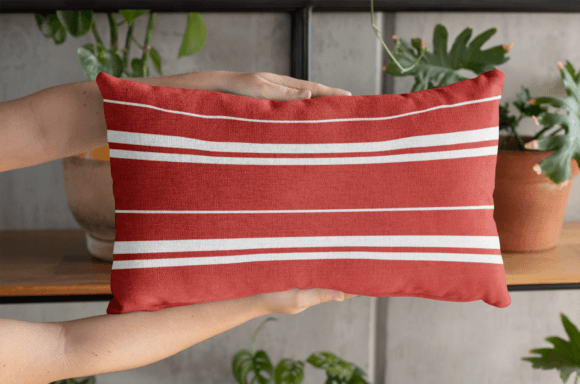
Horizontal Stripes Pack: Why Most Designers Get It Wrong and How to Fix It
You have seen striped patterns everywhere. On pillows, mugs, notebooks, and even gift wrap. But here is the truth that few people talk about. Most decorative stripe packs look lifeless. They stretch badly. They repeat in awkward ways. And they simply do not hold up when printed or applied to real surfaces. That is where the Horizontal Stripes Pack changes the game. This is not just another collection of lines and colors. It is a carefully engineered set of 12 seamless patterns at 300 dpi, each measuring 4444 x 4444 pixels, delivered in high-quality JPG format inside a single zip file. But owning a great pack is only half the battle. The real difference comes from knowing how to use it properly.
Too many people buy a stripe pack, drop it onto a product mockup, and wonder why the result looks cheap or unprofessional. The issue is rarely the pack itself. It is almost always a misunderstanding of how horizontal stripes behave across different surfaces, materials, and use cases. Let me walk you through the most common mistakes, the overlooked details, and the practical corrections that will help you get real results.
Mistake One: Treating Horizontal Stripes Like a One-Size-Fits-All Solution
It is easy to assume that a stripe pattern looks the same on every surface. It does not. A design that looks crisp and balanced on a digital wallpaper can feel overwhelming on a small mug. The same pattern that wraps beautifully around a throw pillow might look distorted on a curved hat brim. The Horizontal Stripes Pack gives you 12 distinct files, but each one has its own visual weight, line thickness, and spacing. Using the wrong file for the wrong project is the fastest route to a disappointing result.
Your first step should always be to preview each pattern against your specific product type. Open the file on your screen and overlay it on a silhouette of your item. Ask yourself whether the stripes compete with the shape of the object or complement it. For smaller accessories like notebooks and mugs, choose patterns with thinner, more frequent lines. For larger surfaces like bedding or curtains, bolder stripes with wider spacing create a stronger visual statement.
Another overlooked factor is orientation. Yes, these are horizontal stripes. But your product may have a vertical or curved dimension. A pillow, for example, has a front face and side seams. If you simply drop the full pattern onto the entire pillow without considering how it wraps around the edges, the stripes will appear disjointed. The fix is to align the stripes with the natural horizontal lines of the object. For cylindrical items like mugs, the stripes should run parallel to the rim, not tilt or shift as they wrap around the curve.
Mistake Two: Ignoring Resolution and Scaling
Here is a detail that trips up even experienced creators. The Horizontal Stripes Pack comes at 4444 x 4444 pixels and 300 dpi. That is a high-resolution image that can handle most print and digital applications. But high resolution does not automatically mean correct scaling. If you shrink the pattern too much, the stripes become so thin that they lose definition. If you enlarge it too much, the stripes get thick and blocky, and the texture of the original image may become visible.
The correct approach is to match the pattern scale to the physical size of your product. For a standard mug (roughly 3 to 4 inches in diameter), you want the full pattern to wrap around the surface without repeating in a way that looks like a seam. That typically means using the pattern at a scale where one full stripe cycle fits the height of the mug. For a rug measuring 5 by 7 feet, the same pattern should be scaled up so that the stripes are proportionally larger. Never use the raw file at its native size unless your product is also roughly 4444 pixels wide. Always test print or test render at different scales.
A practical workflow involves opening the pattern in your design software, duplicating it, and applying it to a mockup at three different scale percentages. Compare them side by side. You will often find that one scale looks perfectly balanced while the others feel cramped or stretched. That extra five minutes of testing saves you from wasted materials and disappointed clients.
Mistake Three: Overlooking the Role of Color and Contrast
Stripes are fundamentally about contrast. The relationship between the colored bands and the background determines whether the pattern feels energetic, calm, bold, or subtle. Many people choose the Horizontal Stripes Pack for a project and apply it without considering how the base color of the product interacts with the pattern. A white mug with light gray stripes may look elegant on screen but become nearly invisible under warm lighting. A dark navy notebook with black stripes loses all definition.
You need to evaluate contrast in real-world conditions. View the pattern on a calibrated monitor, but also print a small sample if possible. Consider the lighting environment where the product will be used. A rug in a bright sunlit room can handle bolder contrast. Curtains in a dim bedroom may need lighter, more diffused stripe patterns. If you are selling digital wallpapers, remember that users have different screen brightness levels. Test your design on both a bright and a dim screen to ensure the stripes remain visible.
Another nuance is color harmony. The 12 files in the pack offer variety, but you still need to match them to your existing palette. A stripe pattern with warm undertones can clash with a cool-toned background. If you are using the pattern on a product label or gift wrap, make sure the stripe colors complement the primary branding colors rather than fighting them. This is not about limiting creativity. It is about making intentional choices that elevate the final result.
Mistake Four: Forgetting the File Format and Compression Trade-Offs
The Horizontal Stripes Pack ships as JPG files. JPG is a compressed format, which means it trades a small amount of image data for a much smaller file size. At 4444 x 4444 pixels and 300 dpi, the quality is excellent for most uses. However, JPG compression can introduce subtle artifacts in areas of high detail, especially along sharp edges between colors. In a stripe pattern, those edges are exactly where you need clarity.
If you are using the pattern for digital applications like websites or social media graphics, JPG is perfectly fine. The compression is barely noticeable on screen. But for high-end print projects such as product labels, fine art prints, or premium gift wrapping, you may want to convert the file to a lossless format like PNG or TIFF before printing. This preserves the hard edges of the stripes and prevents any blurring or pixelation at close viewing distances.
Also, be aware that repeated saving of a JPG file progressively degrades quality. If you plan to edit the pattern, crop it, or combine it with other elements, always work from the original JPG in a lossless workflow. Save your working file as a PSD, AI, or TIFF, and only export the final version back to JPG if needed. This one habit protects the integrity of the stripes from start to finish.
Mistake Five: Underutilizing the Multipurpose Versatility
The Horizontal Stripes Pack is advertised as a multipurpose solution, and that is entirely accurate. But many people confine it to one or two applications. They use it for pillows and maybe mugs, but never explore its potential for die-cutting, digital wallpapers, product labels, or gift wrapping. This is a missed opportunity.
Consider die-cutting. If you create stickers, labels, or custom-shaped stationery, a horizontal stripe pattern can serve as a striking background or a full-cover design. Because the pattern is seamless, you can scale it to fit any die-cut shape without worrying about awkward seams or visible repeats. The key is to align the stripe direction with the orientation of the cut shape. A tall, narrow sticker benefits from horizontal stripes that run across its width, while a wide, short sticker looks better with stripes that span its full length.
Digital wallpapers are another area where this pack shines. A well-chosen horizontal stripe pattern can add depth and rhythm to a screen background without overwhelming the icons and text. The 4444 x 4444 pixel resolution is more than enough for most desktop monitors and tablets. For mobile devices, you may need to crop and scale, but the seamless nature of the pattern means you can adjust without visible breaks.
Gift wrapping is perhaps the most underrated use case. A carefully selected stripe pattern turns a simple box into a personalized gift. You can wrap the entire box, use the pattern as a band or accent, or combine it with solid-colored paper for a layered look. Because the files are high resolution, the stripes remain crisp even when wrapped around corners. Just be careful to match the stripe orientation so that the pattern flows naturally across the package.
Mistake Six: Buying Without Checking the File Details First
This is the mistake that happens before you even download the pack. Many buyers see the preview images, like the style, and purchase without confirming that the technical specifications match their needs. The Horizontal Stripes Pack includes 12 JPG files at 300 dpi and 4444 x 4444 pixels, all zipped together. That is a generous resolution for both print and digital use. But if you need vector files for infinite scalability, or if you need PNG files with transparency, this pack will not meet those expectations out of the box.
Before you buy, ask yourself what you are actually going to do with the patterns. If you are printing on fabric, paper, or vinyl, JPG at 300 dpi is ideal. If you are building a website or app, the same files work well, but you may want to downsize them for faster loading. If you need to edit the colors or rearrange the stripes, you will need to convert the JPG to an editable format. The pack gives you a fantastic starting point, but it is not a magic wand. Knowing exactly what you need before you open the zip file saves you time, money, and frustration.
Another detail that gets overlooked is the aspect ratio. At 4444 x 4444 pixels, the file is perfectly square. That is great for many applications, but not all. If your product is rectangular, you will need to crop, tile, or stretch the pattern. Tiling works beautifully because the pattern is seamless. Stretching is not recommended unless you maintain the original aspect ratio. Cropping is the safest option and preserves the stripe integrity.
The Bottom Line on Using Horizontal Stripes Well
The Horizontal Stripes Pack is a genuinely versatile design asset. With 12 high-resolution files at 300 dpi in a convenient zip format, it covers a wide range of creative needs. But owning the tool is only part of the equation. The real value comes from understanding how to match the pattern to your product, how to scale it correctly, how to evaluate contrast and color, and how to extend its use beyond the obvious applications.
Take the time to test each file against your specific project. Adjust scale, check contrast, and think about orientation before you commit to a final design. Avoid the common temptation to use the same pattern at the same size for every project. Treat each stripe file as a unique ingredient, and choose the one that fits the dish you are cooking up.
Whether you are a small business owner designing product labels, a hobbyist personalizing notebooks and bags, or a marketer creating branded gift wraps, the principles remain the same. Start with the right technical foundation. Preview before you print. And never underestimate the difference that careful scaling and contrast management can make. When you get those details right, the stripes do not just decorate your project. They become an integral part of its identity.