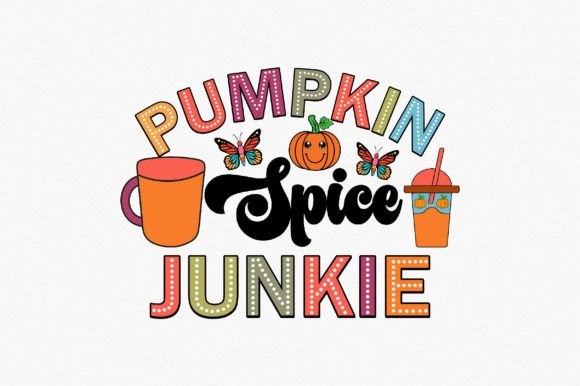
Pumpkin Spice Junkie Design Bundle for Apparel & Products
If you have ever searched for a design that captures the cozy, warm feeling of autumn while offering real flexibility for printing, the Pumpkin Spice Junkie design bundle deserves a closer look. This set is built around a playful nod to the beloved seasonal flavor, but it goes far beyond a simple graphic. It is a complete package of vector files, high-resolution PNGs, and editable formats that let you take the design from concept to finished product with minimal friction. Whether you are a seasoned creator or someone just starting to explore print-on-demand or DIY projects, understanding what this bundle includes and how to use it can save you time, frustration, and money.
What Exactly Is the Pumpkin Spice Junkie Design?
At its core, the Pumpkin Spice Junkie design is a vector illustration that celebrates all things pumpkin spice. The artwork is built with 100 percent vector shapes, which means each line, curve, and color area is mathematically defined rather than made of pixels. This gives you the freedom to resize the design to any scale without losing sharpness. You can place it on a tiny mug or a large hoodie back print, and the quality remains consistent. The design itself typically features playful typography, seasonal motifs like leaves or pumpkins, and a color palette that evokes crisp autumn days. But the real value lies in what you get alongside the artwork itself.
What File Formats Are Included and Why They Matter
When you purchase this design, you receive a compressed ZIP file containing six file formats. Each format serves a specific purpose, and having them all ensures you can work with the design no matter what software or printing method you use. Here is what is inside the bundle:
- PNG File – Print-ready, 4500×5400 pixels at 300 dpi, with a transparent background. This is your go-to format for online mockups, social media posts, and direct printing on many platforms. The high resolution means you can print it at large sizes without pixelation.
- EPS File – A vector format compatible with Adobe Illustrator, CorelDRAW, and many other professional design tools. EPS files are ideal for commercial printing and allow full editing of paths, colors, and shapes.
- PDF File – Universally accessible and great for sharing with clients, print shops, or collaborators. The PDF retains vector quality and can be opened on almost any device without special software.
- AI File – The native Adobe Illustrator file. If you use Illustrator, this gives you the most direct editing experience with all layers, groups, and effects intact.
- SVG File – A web-friendly vector format perfect for use in Cricut, Silhouette, or other cutting machines. SVG files are also excellent for websites, app interfaces, and digital projects where scalability matters.
- All files compressed in one ZIP file – You will need to extract them using WinZIP, WinRAR, or a similar tool. This keeps everything organized and easy to download.
Having all these formats means you are not locked into one workflow. Whether you design on a laptop, a tablet, or a desktop, there is a file that will work. The bundle also includes a support JPG and a transparent PNG, which are useful for quick previews or placements where you do not need full vector editing.
Who Can Benefit from This Design Bundle
The Pumpkin Spice Junkie design is versatile enough to serve a wide range of people. Here are some scenarios where it shines:
Print-on-Demand Sellers and Small Business Owners
If you run a print-on-demand store on platforms like Printful, Redbubble, or Amazon Merch, the transparent PNG and high-resolution specs make uploading straightforward. You can place the design on t-shirts, hoodies, sweatshirts, tote bags, pillows, mugs, and more. The 4500×5400 pixel size covers even the largest print areas, so you do not need to stretch or upscale. The vector formats let you adjust colors to match your brand palette or offer seasonal variations without starting from scratch.
DIY Crafters and Hobbyists
For personal projects, the SVG file is a dream. You can load it into Cricut Design Space or Silhouette Studio and cut heat transfer vinyl for custom apparel, bags, or home decor. The transparent PNG is also excellent for sublimation printing on mugs, coasters, or ceramic tiles. Because the design is fully editable, you can resize, rotate, or recolor it to fit the specific product you are making.
Freelance Designers and Creative Professionals
Having the AI and EPS files means you can treat the Pumpkin Spice Junkie design as a base for client work. You might adjust the typography, swap out elements, or build a whole autumn collection around it. The vector nature ensures your final output is crisp for both digital and print use. If a client wants a version for a sweater and another for a notebook, you can quickly duplicate and modify the file.
Bloggers, Marketers, and Content Creators
Even if you do not plan to sell physical products, the high-quality PNG is perfect for social media graphics, blog post headers, or email newsletters with a seasonal theme. The transparent background lets you overlay the design on photos or patterned backgrounds. You can also use the SVG to create animated graphics for web use.
Practical Use Cases for the Pumpkin Spice Junkie Design
Let us walk through a few realistic examples to show how the design can be applied in different contexts.
Example 1: You run a small Etsy shop selling custom mugs. You download the PNG file, upload it to your print provider, and order sample mugs with the design in full color. Because the PNG has a transparent background, it blends cleanly onto the mug surface. Later, you want to offer a version with a dark background, so you open the AI file, invert the colors, and export a new PNG. The whole process takes minutes.
Example 2: You are a hobbyist who loves making holiday gifts. You use the SVG file with your Cricut to cut iron-on vinyl for a hoodie. Since the design is made of vector shapes, you can easily resize it to fit the back of the hoodie without losing detail. You also make a matching pillow by sublimating the PNG onto polyester fabric. The consistent quality across formats ensures both projects look polished.
Example 3: A freelance designer is hired to create a fall-themed merchandise line for a local coffee shop. They start with the EPS file, adjust the color scheme to match the shop’s branding, and add custom text. The layered vector structure makes it easy to modify individual elements. They export a high-resolution PNG for the shop’s online store and a PDF for the screen printer. The bundle saves them hours of redrawing.
Key Considerations Before Using the Design
Before you download and start using the Pumpkin Spice Junkie bundle, there are a few important points to keep in mind.
- You need extraction software. The files come in a ZIP archive. If you are not familiar with extracting ZIP files, you will need WinZIP, WinRAR, or the built-in extraction tools on your computer. This is standard for most design bundles, but it is worth noting if you are a beginner.
- Mockup is not included. The bundle contains the design files only. If you want to show the design on a shirt or mug in your product listings, you will need to purchase or create your own mockups separately.
- Editing requires compatible software. While the PNG is ready to print as-is, editing the vector files (EPS, AI, SVG) requires software like Adobe Illustrator, CorelDRAW, Affinity Designer, or a free alternative like Inkscape. If you only need the design for personal use and do not plan to modify it, the PNG is all you need.
- Resolution is optimized for large prints. At 4500×5400 pixels and 300 dpi, the PNG is excellent for most print applications. However, if you plan to use it for something extremely large like a banner or poster, you may want to test a scaled version to ensure it meets your needs.
- Color accuracy can vary. The design looks great on screen, but printed colors depend on your printer, ink, and substrate. Always request a sample print before running a large batch, especially if color fidelity is critical for your brand.
- Licensing terms matter. Check the license that comes with the bundle to understand how you can use the design commercially. Most bundles allow you to use the design on products you sell, but restrictions may apply to reselling the design file itself.
Why Vector Shapes Make a Difference
One of the standout features of this bundle is that every element is made with 100 percent vector shapes. If you are new to design, you might wonder why that matters. A vector file stores each part of the artwork as a mathematical formula. This means you can scale it to billboard size without blurring, and you can change colors in seconds without having to repaint anything. For the Pumpkin Spice Junkie design, this translates to real flexibility. You can shift the orange to a deeper rust, make the text white instead of black, or remove certain elements if you want a simplified version. The vector formats also produce much smaller file sizes compared to high-resolution raster images, making them easier to share and store.
Getting Started with the Bundle
If you are ready to use the Pumpkin Spice Junkie design, here is a simple workflow that works for most people, regardless of skill level.
- Download the ZIP file from your purchase confirmation page or email.
- Extract the contents using WinZIP, WinRAR, or your computer’s built-in extraction tool. On a Mac, double-click the ZIP file. On Windows, right-click and select “Extract All.”
- Browse the folder. You will see the PNG, EPS, PDF, AI, SVG, and support JPG files. Pick the format that matches your project:
- For direct printing: use the PNG file.
- For editing colors or sizes: use the AI or EPS file.
- For cutting machines: use the SVG file.
- For sending to a print shop: use the PDF or EPS file.
- Open the file in your chosen software. If you are using the PNG, it will open in any image viewer or editor. For vector files, use Illustrator, CorelDRAW, Affinity Designer, or Inkscape.
- Make any modifications you need: change colors, adjust size, combine with other elements.
- Export your final version as a new PNG or PDF for printing. Save a working copy in the native format so you can edit again later.
This approach works whether you are making one item for yourself or preparing a product line for a store.
Final Thoughts on the Pumpkin Spice Junkie Bundle
The Pumpkin Spice Junkie design offers a rare combination of playful seasonal appeal and professional-grade file support. It is not just a graphic; it is a toolset that adapts to how you work. The inclusion of multiple vector and raster formats means you are covered whether you are screen printing, sublimating, cutting vinyl, or sharing online. For anyone who regularly creates autumn-themed products, this bundle can save hours of design time and provide a consistent, high-quality result across different products and platforms.
If you are the kind of person who loves the look and feel of pumpkin season and wants to share that through your creative projects, the Pumpkin Spice Junkie design gives you a solid foundation. Just remember to check the license, have extraction software ready, and test your prints before going all in. With that done, you will be able to bring a bit of autumn warmth to everything from sweaters to mugs with confidence.