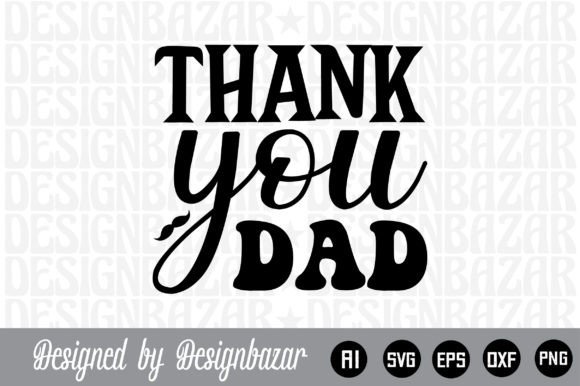
Thank You Dad: A Versatile Word-by-Layer SVG Set for Meaningful Projects
Expressing gratitude to a father figure is a timeless gesture. Whether for a birthday, Father’s Day, a retirement celebration, or simply a heartfelt surprise, the medium you choose matters just as much as the message. For creators, small business owners, and hobbyists who work with cutting machines or digital design tools, the Thank You Dad word-by-layer SVG set offers a practical, repeatable way to turn that sentiment into a tangible product. This digital download is not a physical item but a collection of vector files designed to be cut, printed, or further edited—giving you full control over the final result.
Understanding the Thank You Dad SVG Set
This download package contains five file types, each tailored for a specific workflow: an Adobe Illustrator source file (.ai), a layered SVG file for cutting machines, a high-resolution PNG with a transparent background, an editable EPS vector, and a DXF file compatible with Cricut, Silhouette, Inkscape, Adobe Photoshop, and Illustrator. The “word-by-layer” structure means each word or element in the design is on a separate layer, allowing you to assign different colors, materials, or cut orders. This separation is what makes the set useful for multi-material projects—think vinyl quotes on a mug, layered cardstock on a greeting card, or heat-transfer vinyl on a T-shirt.
Because the files are fully editable, you can adjust sizing, rotate individual letters, or combine the design with other elements before production. The transparent-background PNG gives you a quick preview or a ready-to-use image for mockups, digital cards, or social media posts. For a craft business, having all these formats in one .zip means you can move from concept to finished piece without hunting for converters or re-drawing the artwork.
Before the Project: Planning and Preparation
Before you cut or print anything, the Thank You Dad set helps you visualize the scope of your project. Open the AI or EPS file in your preferred vector software and review the layering. Notice how the words are stacked—you can decide whether to use contrasting colors, different materials (wood, acrylic, glitter vinyl), or a single tone. This is also the time to measure the space where the final piece will go. For instance, if you’re making a wall decal, you can scale the SVG to fit a 12”×12” frame or a 24” wide canvas. Because the files are resolution-independent (vector), scaling up or down does not degrade quality.
If you plan to sell custom “Thank You Dad” items in your online shop, you can use the layered structure to create multiple variations. Duplicate the file, change the colors of each layer, and save as a new design. This preparation phase reduces material waste—you only cut what you’ve already tested in software.
During Production: Cutting, Printing, and Assembly
When you move to actual production, the SVG and DXF files are your primary tools. Import the SVG directly into Cricut Design Space, Silhouette Studio, or any machine-compatible software. The word-by-layer arrangement means you can assign each layer to a different mat or cut setting. For example, the word “Thank” might be cut from gold vinyl, “You” from blue, and “Dad” from dark grey. If you are using a scoring tool or a foil transfer accessory, the separated layers let you apply those effects selectively.
The PNG (300 DPI, transparent background) becomes useful for sublimation printing or for creating digital proofs. You can place the PNG onto a mockup of a mug or T-shirt and show it to a client before committing to a cut. For a hybrid project—say, a layered card with a printed background—the PNG acts as a print layer while the SVG guides the cut lines.
Assembling the final product is straightforward because the layers are already logically separated. You do not have to guess which part goes on top; the file structure mirrors the assembly order. This consistency is especially valuable when producing multiple units. If you run a small craft business, you can save time by setting up a repeatable workflow: open the SVG, size it, assign materials, cut, weed, and apply.
After Completion: Quality Control and Reuse
Once the physical item is finished, you can check the alignment and color balance against the original AI or EPS file. If any layer is off, you know exactly where to adjust in the source file for the next iteration. The digital files also serve as a template library. After you finish a “Thank You Dad” project, you can archive the design with notes about material usage and machine settings. When a customer requests a similar phrase (e.g., “Thanks Dad” or “Love You Dad”), you can duplicate the layered file and swap out the text while preserving the same layout discipline.
For long-term use, having the editable vector formats means the design never becomes obsolete. File formats like SVG, EPS, and AI are widely supported across versions and software updates. Even if you upgrade your cutting machine or switch from Silhouette to Cricut (or vice versa), you can open the DXF or SVG without losing layer information. This portability is a practical advantage over proprietary formats that might require conversion later.
Practical Implementation Tips for Consistent Results
- Check layer order before cutting. Open the SVG in a free viewer (like Inkscape) to ensure the layers are sorted correctly. Some machines read bottom layers first; adjust accordingly.
- Use a test cut. Cut a small section of the design (e.g., a single letter from the “Dad” layer) on scrap material to verify blade depth and pressure. This is especially important when working with layered cardstock or thick vinyl.
- Leverage the DXF for compatibility. If your software cannot import SVG layers cleanly, the DXF file often preserves line geometry better. Test both formats to see which works best with your machine.
- Color-code in software. Before sending to the cutting machine, assign a distinct color to each layer in your design workspace. This visual cue helps you quickly identify which layer should be cut from which material.
- Resize with care. While vector files scale infinitely, consider the physical limitations of your material. A word that is too thin might break when weeded; a layer that is too large might exceed your mat size. Always preview to scale.
- Combine with other design elements. The Thank You Dad set works well as a centered focal point. You can add a border, a heart shape, or a background pattern without interfering with the layered structure. Just place those additional elements on separate layers so cutting remains clean.
Long-Term Use and Reusability
One of the strongest arguments for investing in a digital download like this is its reusability. Unlike a single-use physical product, the files can be duplicated and repurposed indefinitely. You can print the PNG for a one-time card, then later use the SVG to cut a larger version for a wall art piece. The EPS file can be opened in print-on-demand platforms that accept vector uploads, enabling you to sell merchandise without holding inventory.
For educators and bloggers, the set can serve as a teaching example. Show students how layer separation works in vector design, or use the files in a tutorial on preparing cut files for a Cricut. Marketers can adapt the artwork for seasonal promotions—swap the word “Dad” for another family relationship and adjust the layers to create a matching set of gifts.
Because the files are delivered via digital download, you avoid shipping delays, customs issues, and storage constraints. Once purchased, the .zip is yours to preserve. Back it up to cloud storage or a dedicated project folder. Over time, you will build a library of layered designs that you can remix, resize, and repurpose for different occasions. The Thank You Dad set becomes a starting point, not an endpoint.
Integrating with Other Tools and Resources
Seamless integration with your existing workflow is key. If you use Adobe Illustrator, the AI file gives you full editability—you can tweak typography, add shadows, or combine with other assets from your creative suite. For Inkscape users, the SVG or EPS opens natively, preserving the layer structure. Photoshop users can exploit the high-resolution PNG for raster-based designs, or import the EPS as a smart object for scaling.
If you run a small shop on Etsy or Shopify, you can use the PNG to create mockups quickly. Drop the transparent image onto a product photo in Canva or Photoshop and adjust opacity. For marketers planning a Father’s Day campaign, the design can be used in email headers, social media graphics, or blog post images. The layered SVG also works with laser engravers (via LightBurn) if you export the appropriate format—though always check your machine’s specific requirements.
Compatibility with multiple platforms means you are not locked into one ecosystem. Whether you are a hobbyist with a single Silhouette machine or a boutique owner with a fleet of Cricut Makers, the same files will work. The key is to test the import behavior once, then save a profile for that file type. Over time, the few minutes spent adjusting settings become negligible against the dozens of projects you can output from the same source set.
Finally, consider the emotional value of the finished product. A layered “Thank You Dad” sign, made with your own hands and materials, carries more weight than a store-bought card. The ability to customize the colors, text arrangement, and even the material (wood, acrylic, premium vinyl) lets you match the recipient’s taste and your own creative standards. The digital download is the tool; your execution is what makes it personal.
In summary, the Thank You Dad word-by-layer SVG set is a practical asset for anyone who wants to produce heartfelt, professional-quality gifts or merchandise. Its multi-format delivery supports a wide range of workflows—from planning and testing to cutting, assembly, and future reuse. By understanding the structure of the files and integrating them into your existing process, you can turn a simple digital download into a reliable resource for repeated, consistent, and meaningful creations.