Molten Gold Texture for Creative Design Projects
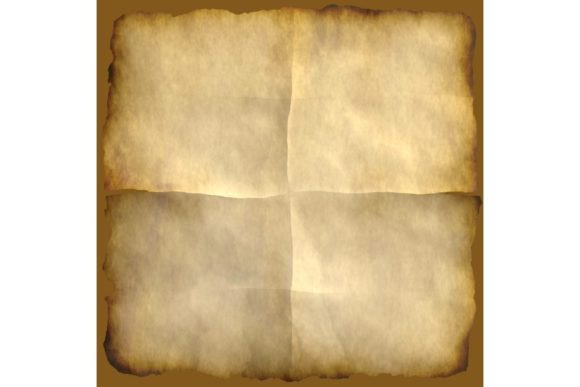
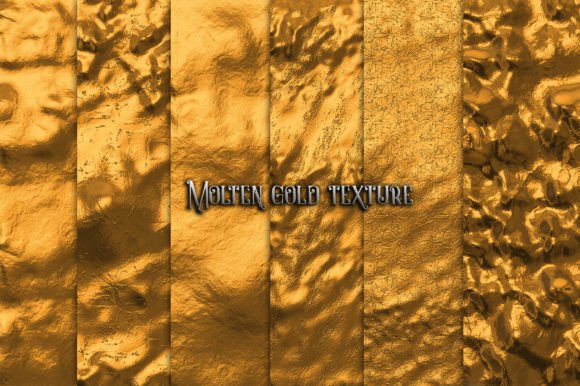
When you work with materials that need to convey warmth, value, and refinement, a molten gold texture offers something that flat colors or basic metallic finishes cannot match. The interplay of light across a richly textured gold surface creates depth and movement that draws the eye and signals quality. Golden Papers, a curated set of six high-resolution JPG files at 300 dpi and 3333 x 3333 pixels, brings this effect into your hands for both print and digital work. Whether you are a stationery designer, a small business owner labeling products, or a hobbyist crafting handmade gifts, this suite gives you a practical way to integrate a premium gold aesthetic without the cost or complexity of real foil stamping.
What Makes a Molten Gold Texture Distinctive
A standard gold gradient can look flat or artificial, especially when printed or viewed on different screens. A molten gold texture, by contrast, simulates the irregular, fluid appearance of heated metal. The subtle variations in brightness, the soft highlights, and the faint shadows within each file create a surface that feels tangible. This matters because your audience or customers often respond to tactile cues even in two-dimensional work. When you place a molten gold texture behind text or use it as a background element, the design gains a sense of depth that holds attention longer.
The practical advantage here is flexibility. Because the texture is rendered at a generous resolution, you can scale it, crop it, or layer it without losing detail. You are not locked into a specific layout or composition. If you need a full-bleed background for a notebook cover, you have the pixel dimensions to support it. If you need a small accent area for a gift tag, you can extract a section and still retain the molten gold quality. This kind of adaptability reduces the time you spend adjusting assets and lets you focus on the creative decisions that matter most.
Practical Applications for Print Projects
Paper crafts remain one of the most direct ways to use a molten gold texture because the results are immediate and shareable. Consider a journal cover. A plain notebook becomes a personalized item when you wrap it with a printed sheet featuring the textured gold finish. The contrast between the smooth paper and the visual weight of the gold creates a cover that feels intentional and polished. Similarly, wedding invitations benefit from a gold-foil effect without the per-piece cost of actual foil application. You can print the texture directly onto card stock, or use it as a digital overlay in your layout software before sending the file to a printer.
Product labeling is another area where a molten gold texture adds real value. Small-batch products—candles, skincare items, artisanal foods—often compete on shelf appeal. A label with a gold-toned background signals premium positioning. Because the texture is photographic rather than vector-based, it carries the organic feel of real metal, which can make a product seem more handcrafted. When you design labels, you can also extract a portion of the texture to use as a subtle watermark or border element, giving the packaging a cohesive upscale look without overwhelming the product name or ingredients.
Money envelopes, gift cards, and party decorations all benefit from the same treatment. A birthday card or envelope lined with a molten gold texture adds a layer of thoughtfulness. For origami or decoupage, the texture acts as a decorative paper in its own right. You can cut shapes, fold edges, or layer multiple pieces, and the gold surface will catch light differently depending on the angle. The key is that you are not limited to one application. The same set of six textures can serve as wrapping accents, table scatter, or focal points on a handmade card.
Extending the Texture into Digital Work
While the name Golden Papers suggests a print-focused tool, the digital applications are equally practical. Web graphics, social media templates, and digital wallpapers gain a professional finish when you incorporate a molten gold texture as a background or accent. If you manage a brand's online presence, a consistent gold element across product pages, email headers, and promotional banners can reinforce a luxury feel. Because the textures are provided as JPG files, they load efficiently and work with most design software, including Canva, Photoshop, Illustrator, and Affinity.
Digital wallpapers for devices or presentations also benefit. A subtle gold texture behind a quote or a product mockup creates a backdrop that is visually interesting without competing with the foreground content. The 3333 x 3333 pixel size covers standard desktop and tablet resolutions with room to spare. You can tile the texture if you need a larger canvas, and because the pattern is organic, the seams are not visually distracting.
For marketers and bloggers, using a molten gold texture in featured images or section dividers helps establish a visual theme. If you regularly create content around celebrations, milestones, or premium products, having a go-to texture set reduces the time you spend searching for suitable backgrounds. You develop a signature look that your audience recognizes, and because the textures are consistent in quality, your content maintains a professional standard across posts.
Who Benefits Most and Why
Freelance graphic designers and small studio owners will find this set valuable because it fills a specific niche. Real metallic textures can be difficult to capture or create from scratch. Lighting conditions, camera settings, and post-processing all affect the final look. A pre-made set at a reliable resolution eliminates the trial-and-error phase. You can drop the texture into a client project and adjust the opacity, blend mode, or hue to match the brand palette.
Event planners and wedding coordinators also gain a practical resource. When you need mockups for invitation suites, signage, or welcome bags, a molten gold texture elevates the proposal without requiring you to print physical samples. You can show clients a realistic representation of how their stationery will look, which builds trust and reduces revisions later in the process.
Hobbyists and crafters should not overlook the set either. If you enjoy journaling, scrapbooking, or card making, having a digital gold texture means you can print as many sheets as you need at home or at a local print shop. You are not purchasing pre-made gold paper that may not match your project's dimensions or tone. You control the output. This independence is especially useful when you are working on multiple projects with different size requirements.
Practical Considerations and Limitations
No tool is right for every situation, and a molten gold texture set has boundaries worth noting. Because the files are raster images (JPG), they do not scale infinitely like vector graphics. If you need a gold texture for a billboard or a large-format banner, the 3333 pixel width may require upscaling, which can soften the detail. For standard print sizes such as letter, A4, or even 12x12 inch scrapbook pages, the resolution is more than sufficient.
Also consider the color profile. JPG files are typically in the sRGB color space, which works well for digital screens and most consumer printers. If you are preparing files for professional offset printing, you may need to convert the textures to CMYK and adjust the gold tones to match your printer's output. Testing a small sample before committing to a large print run is always wise.
The set includes six distinct textures. While that provides variety, you will want to examine each one to see which best suits your project. Some textures may lean warmer or cooler, and some may have more pronounced grain or highlight patterns. This variation is actually a strength because it gives you options, but it means you should preview them against your specific design elements before settling on one.
Making the Most of the Set
To get the best results from a molten gold texture, treat it as a raw material rather than a final finish. Experiment with blending modes in your design software. Overlaying the texture on a solid color background can shift the gold tone toward rose, champagne, or antique brass. Adjusting the opacity softens the effect, making it suitable for background use without overpowering text or images.
You can also combine multiple textures from the set. Layer one texture as a base and another as an accent on a specific area. This approach works well for invitations where the main block is a subtle gold texture and the border or monogram uses a more pronounced version.
Think about contrast. A molten gold texture against a deep navy, charcoal, or cream background tends to look most striking. If you place it on a white or very light background, the gold can appear washed out. Testing different background colors in your software before printing saves time and materials.
Final Thoughts on Elevating Your Work
A molten gold texture is not a shortcut to good design, but it is a reliable foundation. When you have a versatile set like Golden Papers at hand, you reduce the friction between an idea and a finished piece. The texture does the heavy lifting of conveying richness and care, leaving you free to focus on composition, typography, and layout. Whether you are preparing a small batch of handmade cards, designing a product line, or building a digital brand presence, the ability to call up a realistic gold surface on demand simplifies your process and strengthens your final output. The set's resolution, file count, and format offer practical value for anyone who regularly works with premium aesthetics, and the limitations are manageable with a bit of forethought. Explore the textures, test them in your projects, and let the natural depth of the gold finish amplify the work you already do well.